
Creating an app with Power Apps is done with low-code/no-code tools, but there are also built-in functions that allow you to do much more.
Thinking about reusing formulas through UDF (User Defined Functions) allows you to create custom and reusable functions.
Reuse logic by writing it only once.
Simple updates by correcting or modifying the function in one place and then applying it to the rest of the app.
And not only that, there is also the possibility to create functions with user-defined types (UDT) to manage more complex data such as records or tables in a single operation.
Prerequisites
Once the app is created, go to settings and enable these 2 new features

Use Case
Suppose you need to manage the purchase of corporate devices (such as PCs or smartphones) for which we have the following characteristics:
- Retail Price
- Discount Applied
- Reserved Price
Go to “Variables” and create a new “Named Formula”
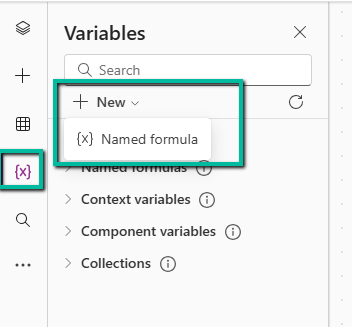
Then I create my formula called “Calculator” as follows:
Calculator(
RetailPrice:Number,
AppliedDiscount:Number
): Number = RetailPrice * (AppliedDiscount / 100);
At this point, I can reuse this function within my app by calling it by the inserted name “Calculator”.
I create 2 “Text Input” fields related to the Retail Price and the Reserved Discount, and a button on which I apply this formula in the “On select” property that calls my “Calculator”.
Notify(
$”{Calculator(
TextInput_RetailPrice.Value,
TextInput_AppliedDiscount.Value
)}”
)
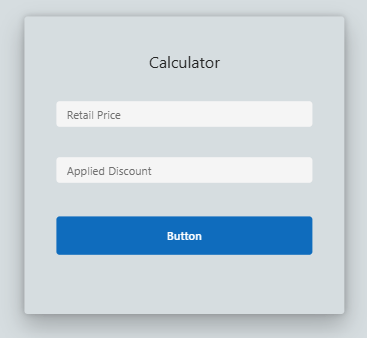
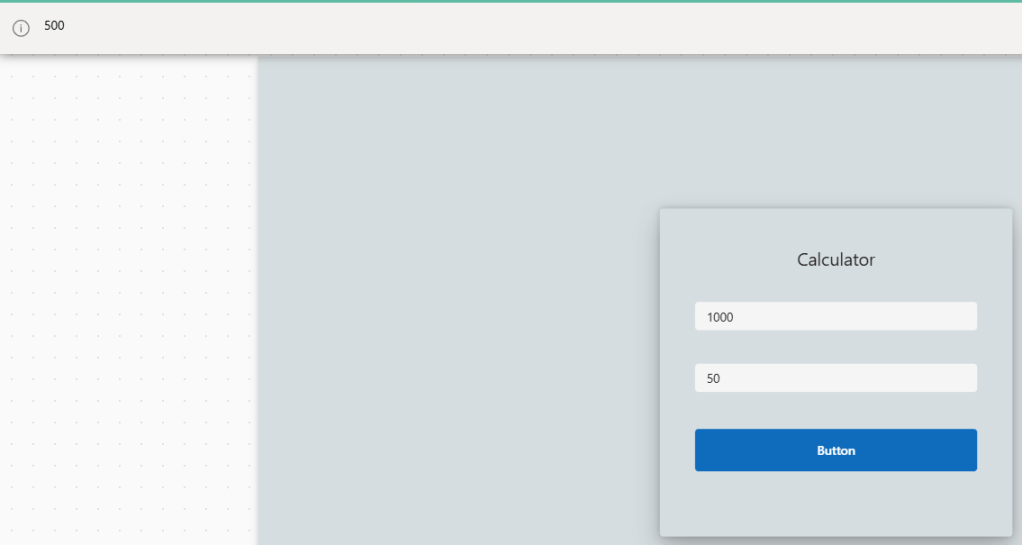
Here, then, is my notification popup “Notify” when tested
Why use this feature?
To speed up the app-building process, ensuring accurate and dynamic calculations based on the context.
Similarly, UDT (User-Defined Types) also simplifies working with custom or structured data types.
With user-defined types, it is possible to define a custom type to group all these fields into a single reusable structure.
For more information:
https://community.powerplatform.com/blogs/post/?postid=8ca04f39-c3de-ef11-a730-000d3a54c80b
Boom Done 💣
Follow me:
 BEYOND THE PLATFORMS
Leave a comment