Automating Social Media Captions with Power Apps and AI Hub: A Guide for the Marketing Team
An intelligent helper for social media content
In the world of digital marketing, creating effective social media content requires time, creativity, and consistency. But what if we could automate part of the process while maintaining quality and personalization?
Thanks to Power Apps and AI Hub functionality, you can automatically generate captions for various social channels (Instagram and LinkedIn in my example) starting from a simple image.
This tool is designed to support marketing teams, saving time and offering creative ideas consistent with the target channel.
How does the process work?
1. Creating the app in Power Apps
The app is built in Power Apps with a simple interface that allows the user to:
- Upload an image (e.g., a photo of an event, product, or campaign)
- Send the image to the AI model through AI Hub
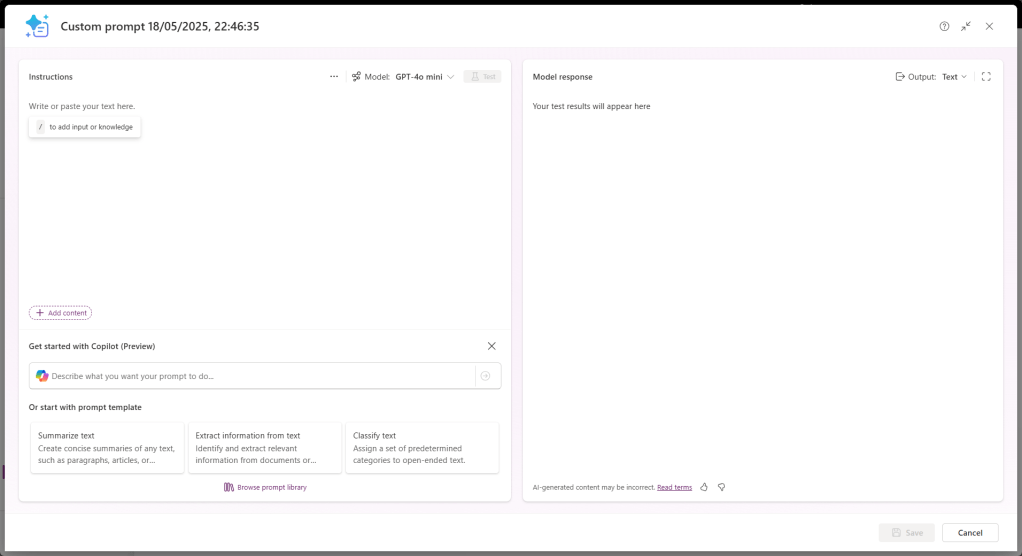
Accessing Power Apps, select AI Hub, and finally go to the Prompts section.

It is very interesting to see dozens of Prompt templates available, but what I will do is click on Build your own prompt.
At this point, a pop-up appears allowing me to generate what I need.
2. Customized Prompt for AI Hub
The core of the process is a tailored prompt, guiding the AI in generating two distinct captions:
You are a social media expert. Based on the uploaded image, generate two different captions:
- Instagram Caption: Write a short, engaging, and visually appealing caption suitable for Instagram. Use a friendly and informal tone. Include relevant emojis and hashtags. End the caption with a creative and compelling call to action.
- LinkedIn Caption: Write a professional and informative caption suitable for LinkedIn. Use a formal or semi-formal tone. Focus on the business value, insights, or storytelling behind the image. End the caption with a professional call to action.

Output of the model
The model returns two captions:
- One for Instagram, with a creative tone, emojis, and hashtags
- One for LinkedIn, with a professional and business-oriented tone
Both include a Call To Action to encourage interaction.
At this point, I upload an image:

4. Final result
The user views the generated captions and can copy them directly for social media use.

Conclusion: Benefits for the Marketing Team
Using Power Apps and AI Hub to generate social captions offers numerous advantages:
- Time-saving: automates part of the work
- Tone consistency: adapts the message to the specific channel (Instagram vs LinkedIn)
- Creativity boost: provides new and original ideas
- Ease of use: accessible even to those without technical skills
- Scalability: useful for managing large volumes of content
Boom, done 💣!
Follow me:
 BEYOND THE PLATFORMS
Leave a comment