
It is unfortunately not widely discussed, but sharing and using an agent created in Copilot Studio straight after publication is not the correct approach to take. Let me explain further.
Copilot Studio allows us to create agents without leaving the tool, but just as with Power Apps applications or Power Automate flows, it is not enough to simply develop the project – it is essential to create a release pipeline in a test environment and then move to production.
Let’s take things one step at a time. The correct approach is always to create solutions that contain all the development elements you are working on. While these are well-established concepts, let’s look together at what happens at the Agent/Copilot Studio level.
Create a Solution
After creating and testing an agent, we may feel satisfied, but what exactly must we do next? We create a solution in Power Platform and load our existing agent into it. This is where I started to be pleasantly surprised: once the agent is loaded, all its related components are added as well. You will see something like this.
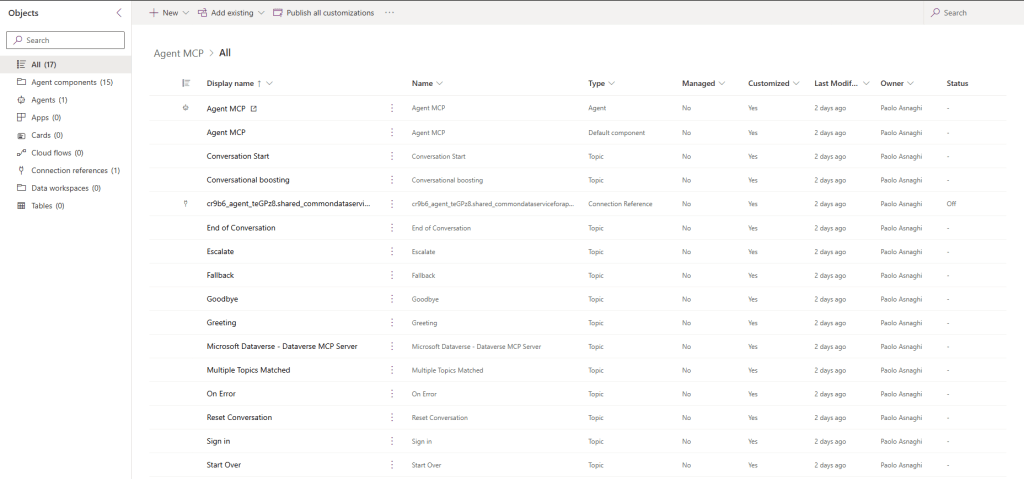
Note that, in addition to all the present topics, there is also the Connection Reference, which allows connection to Dataverse (in this case, the agent uses the MPC to retrieve information from Dataverse). You can find more information at this link -> Copilot Studio – Dataverse & MCP – BEYOND THE PLATFORMS
Managing the Solution
The ability to replicate, share and manage solutions efficiently is what differentiates a local project from a scalable strategy. This is why Microsoft Copilot Studio has introduced advanced features for importing and exporting solutions, making life easier for those of us who work daily with data, processes and artificial intelligence.
The Problem: Isolated and Hard-to-Replicate Solutions
Many teams develop effective Copilot solutions, but these often remain confined to specific environments, making them hard to transfer or reuse. This limits collaboration between departments, slows the spread of best practices and complicates centralised governance.
The Solution: Import/Export in Copilot Studio
With the import and export functionalities, Microsoft Copilot Studio enables you to:
- Export a complete solution (including bots, flows, entities and content) into a .zip file.
- Import that same solution into another environment, maintaining the structure and configurations intact.
- Manage versions, updates and dependencies in a controlled way, thanks to support for development, test and production environments.
This feature is available directly from the Copilot Studio portal, and also allows you to modify the .zip file to adapt the solution to new contexts before importing.
The Solution: Pipelines in Power Platform
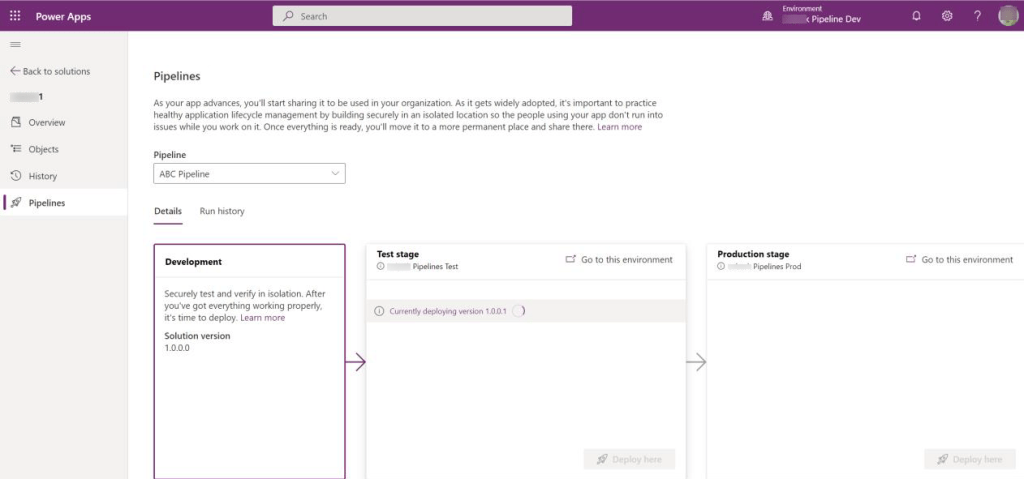
The real step up in quality comes with the integration of Power Platform pipelines. These allow you to:
- Automate the movement of a solution from one environment to another.
- Manage versions and approvals with predefined flows.
- Reduce manual intervention and ensure consistency between environments.
Pipelines can be configured directly from the Power Platform Admin Centre and integrate perfectly with Copilot Studio, making deployment repeatable, traceable and safe.
The Benefits
For those working in data-driven fields, this functionality represents a real leap forwards:
- Scalability: You can replicate successful solutions in multiple environments or locations.
- Governance: Maintain control over versions and changes.
- Collaboration: Share solutions between teams and stakeholders smoothly.
- Efficiency: Reduce development and deployment times.
A Broader Vision: Towards a Modular Ecosystem
This functionality is not just technical: it is a step towards a modular ecosystem, where solutions are no longer isolated monoliths but reusable components that integrate into a broader business strategy. In a context like Italy, where digitalisation is still being consolidated, tools like Copilot Studio can make a real difference.
Boom, done 💣!
Follow me:
 BEYOND THE PLATFORMS
Leave a comment