If you’ve tried Copilot and thought, “Okay, interesting… but sometimes it’s too generic,” you’re not imagining it: the real leap in quality doesn’t come only from the language model, but from how well the AI understands your work, your context, and your organization’s rules. That’s exactly where Work IQ comes in—defined by Microsoft as the intelligence layer that personalizes Copilot for you and your company.
In this article I break it down: what Work IQ is, how it’s built, why it improves the quality and reliability of answers, and what changes for people working in teams.
1) Copilot isn’t “just” a model: it’s a system that lives in real work
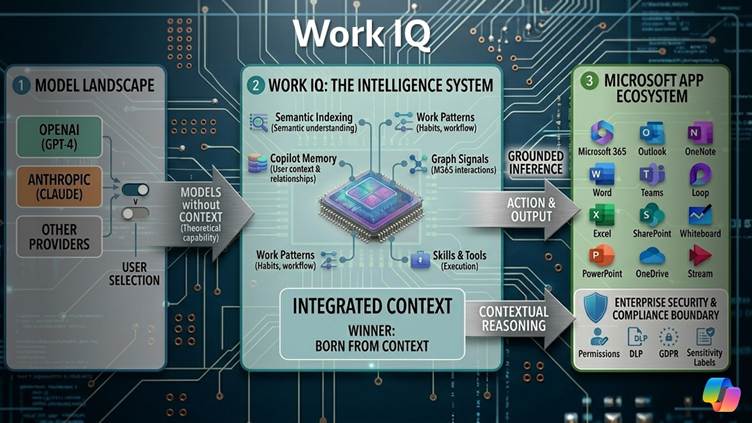
In recent months there’s been endless talk about “which model is stronger.” Microsoft is pushing a more practical idea: Microsoft 365 Copilot can use models from multiple providers and, in some experiences, users can even choose the most suitable foundation model (today, OpenAI and Anthropic are mentioned, with room to add others).
But here’s the key point: Work IQ *complements* the models, because it adds what models alone don’t have—your work context (documents, conversations, relationships, habits, operational flows), within enterprise security boundaries.
In other words: it’s not the assistant that “writes best” that wins—it’s the one that understands *where* and *why* you’re working on something.
2) What is Work IQ (in one sentence)
Work IQ is the intelligence layer that makes Copilot more personalized, more accurate, and more reliable because it understands context, relationships, and work patterns—not just files and connectors.
Microsoft describes it as Copilot’s “brain”: what makes the assistant stop responding generically and start reasoning about how the organization works.
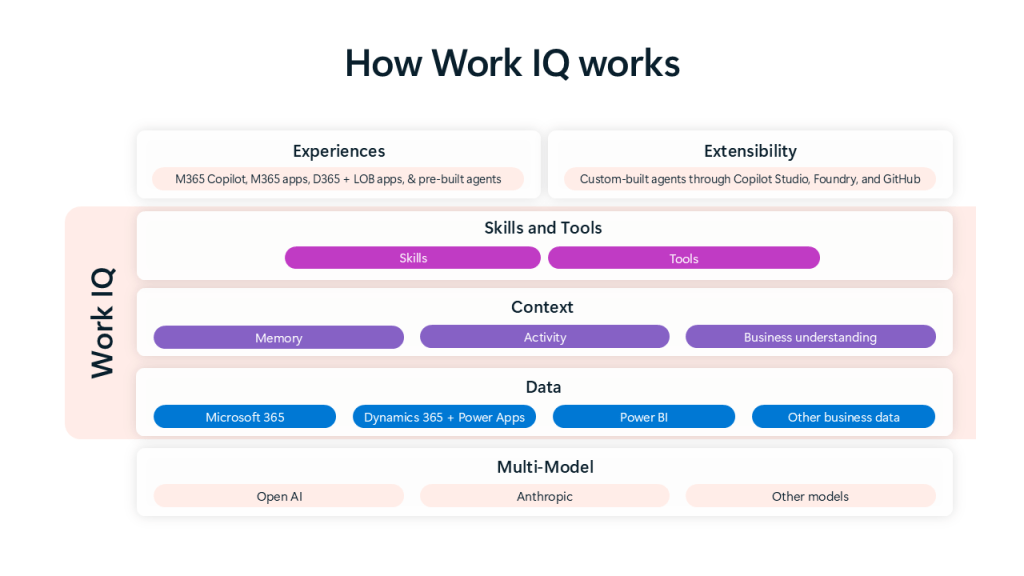
3) The 3 layers of Work IQ: Data, Context, Skills & Tools
Microsoft explains Work IQ as a system made of three integrated layers. What I like about this framing is that it’s readable even outside the tech world: data → context → operational capabilities.
3.1 Data: where the “raw material” comes from
The first layer is Data: Work IQ has secure access to—and understanding of—structured and unstructured data that represents work.
Within Microsoft 365, we’re talking about:
- content in SharePoint and OneDrive (Word, Excel, PowerPoint, and more),
- Outlook email,
- Teams chats and meetings,
- plus signals and metadata that describe how people collaborate over time.
And then there’s a crucial piece for companies: Work IQ can also include business data from non-Microsoft systems through Copilot Connectors (pre-built or custom), bringing that content into the tenant’s perimeter.
In parallel, Microsoft is bringing “work” data from Dynamics 365 and Power Apps into the picture via Dataverse, with the goal of enabling Copilot to reason not only over productivity data (documents and conversations) but also over process and business data.
3.2 Context: the difference between “finding” and “understanding”
This is where the magic happens: Work IQ doesn’t just “access” data—it builds context.
Two key concepts:
(a) Semantic index
The semantic index enables meaning-based retrieval (not just keywords): Copilot can find what matters because it understands the intent, not because it matches the same word.
In addition, the included data keeps existing policies—permissions, sensitivity labels, and tenant boundaries (it’s not a “wild west”).
(b) Copilot memory
Memory is designed to increase personalization and relevance over time. Microsoft distinguishes between:
- explicit memory, created by the user (Custom Instructions, saved memories),
- implicit memory, inferred from chat history and progressively enriched.
And here’s the part to watch: Microsoft says it will work to include activity patterns in apps (Teams, Outlook, Word, Excel, PowerPoint) to increase the “fidelity” of memory.
In practice: Copilot stops being an “answer engine” and becomes an assistant that recognizes recurring context, style, priorities, and relationships.
3.3 Skills & Tools: when AI moves from idea to action
The third layer is the “operational” one: Work IQ includes agentic skills—specialized capabilities that guide Copilot and agents to complete tasks faster and more accurately.
And then there are tools: if skills describe “what to do,” tools are what “actually does it.” Microsoft talks about toolsets that can include MCP server tools, agent flows, APIs, and plugins, orchestrated to observe, retrieve, reason, and execute.
This shift is essential to understand the trend: from assistant to agent (which doesn’t just suggest, but helps get work done).
4) Trust: security, privacy, and compliance are not “nice-to-haves”

Adopting AI in the enterprise isn’t about “wow effect,” it’s about trust.
Work IQ is designed to respect, from day one:
- user permissions,
- Security Groups,
- sensitivity labels,
- Data Loss Prevention (DLP) policies.
Microsoft also highlights regulatory requirements, including GDPR and the EU Data Boundary.
And in the “real world” this translates into increasingly granular controls: for example, Microsoft Purview DLP is expanding protections for Copilot to mitigate oversharing risks, including scenarios related to prompts and web searches that contain sensitive data.
Key message: AI scales in the enterprise only if it can be governed. It’s not enough for it to work—it must work within clear rules.
5) Work IQ isn’t just a feature: it’s a platform (and it extends)
Another often-overlooked point: Work IQ is integrated into Copilot and its main surfaces—Copilot Chat (with the Work toggle enabled) and Copilot across Microsoft 365 apps—and Microsoft states its intention to unify the Work IQ experience across all licensed Copilot surfaces in the coming months.
But there’s more: Microsoft also announces a Work IQ API that exposes Copilot intelligence through a REST interface, enabling developers and teams to create apps and agents grounded in work context (inheriting identity, security, permissions, and compliance).
6) Conclusion: the future of enterprise AI is won on context
If I had to sum up Work IQ in one “adoption-ready” sentence:
Work IQ is what turns a general-purpose AI into an AI that’s useful in everyday work, because it connects data, meaning, memory, and operational capabilities—all within an enterprise-grade security and compliance framework.
👉 In your organization, the problem isn’t “having Copilot,” but “giving it context”: well-governed data, structured content, clear rules, and repeatable use cases.
Boom, done 💣!
Follow me:
 BEYOND THE PLATFORMS
Leave a comment