Category: powerautomate
-

Microsoft AI Tour
Over 2,000 people, including IT professionals, developers, entrepreneurs, and managers, both in-person and online, attended the Italian stop of the Microsoft AI Tour yesterday! We had the pleasure of attending a highly interesting keynote where key figures from the Redmond giant such as Vincenzo Esposito, Asha Sharma, and Matteo Mille took turns on stage. Over…
-
Power Automate dateDifference() Function
Microsoft recently introduced a new function. dateDifference() It may seem trivial but it is not. The functions in Power Automate help facilitate the workflow we are developing and make it more efficient (with fewer steps). Until recently, we would have had to rely on the ticks() function, which is much more complex. Using the new…
-

Power Apps – Plans
With great pleasure, “Plans” has been available in Power Apps for a few days. But what is it and what can it do for me? The official description is “A plan is an AI-based document that allows you to describe a business problem and generate a complete solution with apps, flows, and tables.” Even though…
-

AI Builder
Have you ever thought about extracting information from invoices, receipts, or classifying customer feedback? Or even recognizing objects from an image? Within the Power Platform, there are ready-to-use templates that can be customized. AI Model Both in Automate and Apps, we have the AI Hub. A place where we can find ready-to-use Prompts and AI…
-
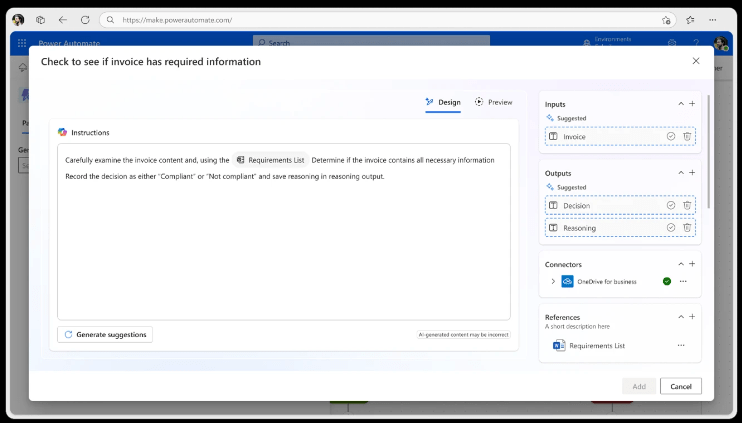
Power Automate – Generative actions
Generative actions are coming and will change the concept of Work Flow! These actions will allow AI-orchestrated actions within automations. 💠 The AI will reason through unstructured content. 💠 Decide the best course of action for more complex tasks. I have always been fascinated by the power of Power Automate, but these new features will…
 BEYOND THE PLATFORMS